
If you cannot confirm your assets even after depositing/withdrawing PANDO Swap, please read the contents below.
In the following case, withdrawn mPANDO will not be confirmed from the PANDO Swap wallet.
1. While consuming available daily withdrawal quantity, withdrawn mPANDO gets restored(re-provide) via mailbox.
▶If the withdrawing quantity exceeds the available daily limit amount, withdrawal to Ingame → PANDO Swap will not proceed.
Please check your mailbox and retained mPANDO quantity if your withdrawal does not proceed.
2. If the wallet address is different, or the PANDO Swap connected account does not match the game account
▶Check the contents down below and confirm the deposited/ withdrawn mPANDO transaction account and wallet address accurately.
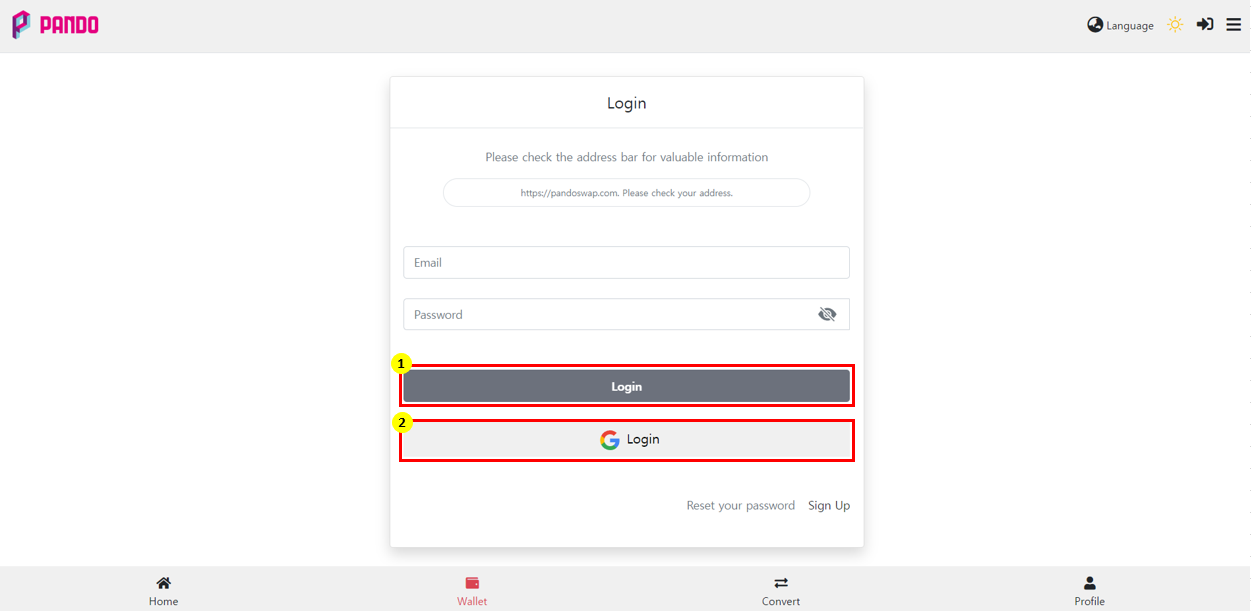
There are two ways of logging in [PANDO Swap].
Depending on the way of logging in, each different wallet address and account can be created even though they are same email addresses.
Please confirm wallet address and ways to access account when you deposit/withdraw mPANDO.
① How to log in with [PANDO Swap] account.
-Type down your email address and password and access by clicking [Log in].
-Creating an account through [membership sign-up]] from PANDO Swap.
※ Use of Gmail address is available.
② Logging in with [Gmail] address
-Click [G-Login] and choose your Gmail address to access and log in.
- As shown in number ① above, you can sign up and login without a separate [membership sign-up] procedure.
※Caution
By using a Gmail account to complete [membership sign-up] as shown in the number ①, and logging in by clicking [G-Login] as instructed in number ②
▶ Even if you use the same Gmail addresses, they are unrelated [PANDO Swap] account and does not work together.